Coordination Agent Overview
Last updated: October 26, 2026
Coordination Agent handles candidate interview requests and keeps interview coordination moving—so schedulers spend less time chasing availability, follow-ups, and handoffs.
Open Coordination Agent
In the left nav, click Agents.
Open Catalog.
On the Coordination Agent card, choose Manage.
If the card shows On request or Coming soon, use Request access from Catalog first (see Agents Catalog).
What it does
Once a profile is attached to jobs or playbooks, Coordination Agent works on candidate interview requests: investigating what’s blocking a schedule, keeping follow-ups current, and—depending on how you configure it—booking, rescheduling, and messaging people.
You’ll manage it from two tabs:
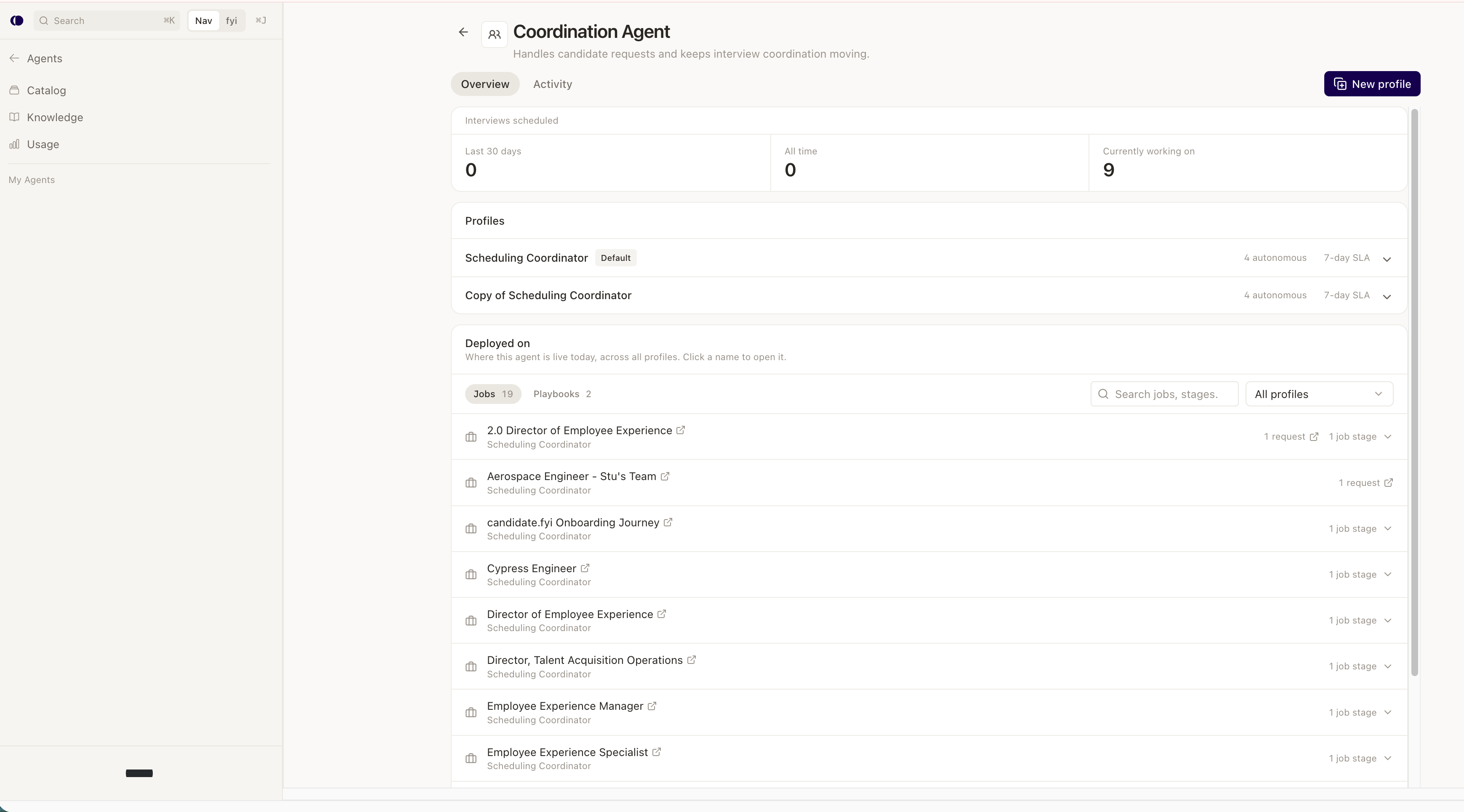
Overview — outcomes, profiles, and where the agent is deployed
Activity — recent work across profiles
Credit use for this agent appears under Usage (Agents → Usage), not on the Manage page itself.
Outcomes on Overview
At the top of Overview, outcomes are labeled Interviews scheduled, with:
Stat | Meaning |
|---|---|
Last 30 days | Interviews scheduled in the last 30 days |
All time | Interviews scheduled overall |
Currently working on | Requests the agent is actively working |
The Catalog card shows a shorter version: Interviews scheduled for Last 30 days plus Currently working on.
Profiles
Below the stats, Profiles lists each Coordination Agent profile (for example a Default profile and any copies).
Typical profile cues:
Default — the primary profile for this agent type
Ghost — this profile is in Ghost execution mode (see below); summary text: “Reports to scheduler”
SLA target on the profile row — for example a multi-day SLA, or No SLA when none is set
From a profile you can open Edit settings or Edit skills. Use New profile to copy an existing profile—profiles are created by copying, not from a blank form.
If you see No profiles yet, your organization needs a first Coordination Agent before you can add more by copying.
Live vs Ghost (concept)
Each profile runs in an Execution mode:
Live — Acts on scheduling: books, reschedules, and messages people.
Ghost — Reports to the scheduler only. It investigates and keeps follow-ups current, but does not book, cancel, or contact interviewers or candidates.
Ghost profiles show a Ghost badge and a callout that the profile reports to the scheduler and does not book, cancel, or message candidates or interviewers.
Use Ghost when you want the agent to advise and prepare work without taking scheduling actions; use Live when it should act.
Where it deploys
Deployed on shows where the agent is live today, across all profiles:
Jobs
Playbooks
Coordination Agent does not deploy to People and does not use Subscribe / My Agents (those apply to other agent types such as AI Interviewer).
Knowledge and credits
Shared documents and written guidance live in Agents > Knowledge. Coordination profiles can include knowledge sources in settings; managing sources is covered in Agent Knowledge.
Monitor credit consumption for Coordination Agent in Usage (see Agents Usage).