Coordination Agent: Nudges only mode and nudge settings
Last updated: November 9, 2026
Approximate read time: 4 minutes
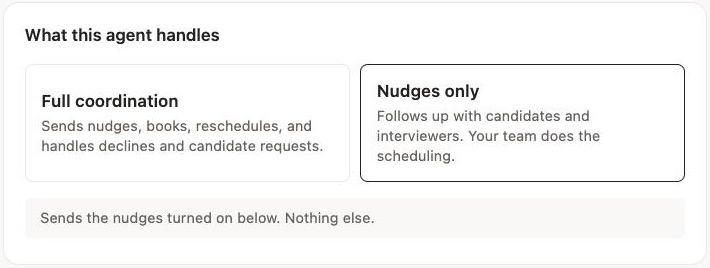
Some teams want help chasing replies but want to keep booking interviews themselves. Nudges only mode does that. The Coordination Agent follows up with candidates, interviewers and your schedulers. It never books, reschedules or answers questions for your team.
The short version
Full coordination: the agent schedules end to end. It books, reschedules, handles declines and candidate requests, and also sends nudges.
Nudges only: the agent sends the nudges you turn on and nothing else. Your team does the scheduling.
Nudges: the reminders and follow-ups the agent sends. You choose which ones run, and they work in both modes.
Before you start
You need to be an Admin to change a Coordination Agent profile.
The Coordination Agent must be turned on for your organization. If it isn't in Agents > Catalog, contact your candidate.fyi team.
[CONFIRM: these screens are in the new candidate.fyi interface only. Say so here if legacy-interface customers will read this.]
Choose what the agent handles
In the left nav, click Agents > Catalog.
On the Coordination Agent card, click Manage.
Under Profiles, open the profile you want to change.
On the Configuration tab, find What this agent handles.
Pick one:
Full coordination: "Sends nudges, books, reschedules, and handles declines and candidate requests."
Nudges only: "Follows up with candidates and interviewers. Your team does the scheduling."
Your change saves right away.
Moving from Nudges only to Full coordination asks you to confirm, because the agent will start booking and rescheduling. Click Switch to full coordination to go ahead.
Moving to Nudges only has no confirm step.
Nudges only and Ghost mode
Ghost mode lets the agent report what it would do without acting. It only applies to Full coordination.
A nudges-only profile always runs live, because sending nudges is the whole job. If the profile is in Ghost mode, the Nudges only card shows "Not available in Ghost mode". Turn Ghost mode off first.
Turn nudges on or off
In the Nudges section on the same Configuration tab, turn on the ones you want:
Nudge | What it does | On by default |
|---|---|---|
Candidate follow-ups | Asks candidates to share availability or pick a time. Up to 3. | Yes |
Interviewer attendance nudges | Reminds interviewers who haven't accepted the invite. | Yes |
Scheduler reminders | Reminds the scheduler when a candidate's availability is waiting. | No |
Candidate interview reminders | Reminds candidates before their interview. | No |
Close when the candidate doesn't reply | After the last follow-up, sends a close-out and cancels the request. | No |
Close when the candidate opts out | Closes the request when a candidate says they're no longer interested. Nudges only mode. | No |
Business hours only | Sends nudges on weekdays, 9am to 6pm in each person's time zone. | No |
How often nudges go out
You don't set the timing by hand. The agent uses a standard schedule:
Candidate follow-ups: 24 to 48 hours apart, up to 3. They're spaced to fit your Time to Interview (days) target. The third follow-up tells the candidate the request will close if they don't reply.
Interviewer attendance nudges: every 4 hours, up to 3.
Scheduler reminders: every 24 hours, up to 2.
Candidate interview reminders: 48 hours and 24 hours before the day's first interview.
Close when the candidate doesn't reply: 48 hours after the last follow-up.
What Nudges only does and doesn't do
It does:
Send the nudges you turned on.
Send the first outreach email to the candidate, when the stage is set so the AI agent owns outreach. [CONFIRM: customer-facing name of the "outreach owner" setting on the stage]
Restart follow-ups when a candidate says "I'll do it later" or gives a date to check back. It restarts up to twice, then lets your scheduler know.
Message the scheduler in Slack or email when something needs a person.
It doesn't:
Book, reschedule or cancel interviews.
Change availability or replace interviewers.
Answer candidate questions for your team.
Search your knowledge documents. The Knowledge sources section is hidden in this mode.
Take over the request. It stays with your team.
Example
Northwind's coordinators want to keep booking every onsite themselves, but they lose hours chasing candidates for availability.
They set their profile to Nudges only and turn on Candidate follow-ups, Scheduler reminders and Business hours only.
Now when a candidate hasn't shared availability, the agent follows up at most three times, during working hours. Once the candidate replies, the coordinator gets a reminder to book.
Troubleshooting
"I can't pick Nudges only." The profile is in Ghost mode. Turn Ghost mode off, then pick Nudges only.
"The agent didn't send a follow-up." Check that Candidate follow-ups is on, and that the profile is on the stage or round for that request. If Business hours only is on, the nudge waits for the next weekday window.
"The agent booked an interview, but I only wanted nudges." The profile is set to Full coordination. Switch it to Nudges only.
"I don't see Knowledge sources." It's hidden in Nudges only mode, because the agent doesn't answer questions in this mode.
Related Articles
Switching from the Nudge Agent to the Coordination Agent (new, link after publish)