Switching from the Nudge Agent to the Coordination Agent
Last updated: November 10, 2026
Approximate read time: 4 minutes
We're retiring the Nudge Agent. The Coordination Agent now sends the same reminders and follow-ups in its Nudges only mode. This article shows how to move your Nudge Agent profiles over in a few clicks, without interrupting candidates who are mid-process.
The short version
The switch makes a new Coordination Agent profile for each Nudge Agent profile you pick. Each new profile is set to Nudges only and copies your nudge settings.
New requests on your stages and people get the new profile. Requests already in progress stay on the Nudge Agent until they finish.
Nothing is deleted. The old Nudge Agent profile stays until you archive it.
Before you start
You need to be an Admin.
Read Coordination Agent: Nudges only mode and nudge settings so you know what the new profile will do.
How to tell if you need to switch
You'll see one or more of these:
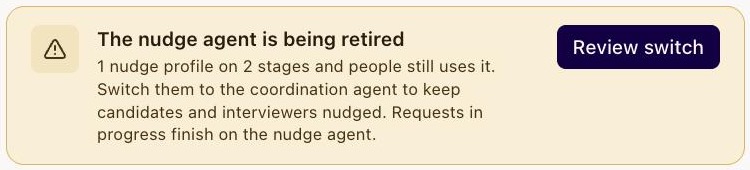
An amber banner on Agents > Catalog and on the Nudge Agent page: The nudge agent is being retired. It tells you how many profiles and stages still use it.
A Switch needed tag on the Nudge Agent card in the Catalog.
On a Nudge Agent profile: "Nudges are moving to the coordination agent." with a Switch button.
Switch your profiles
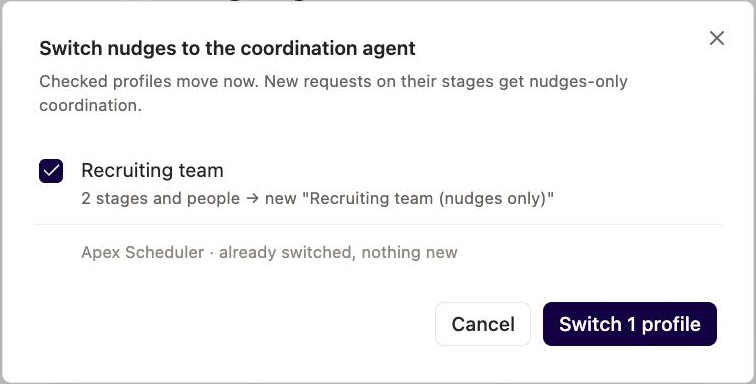
Click \*\*Review switch\*\* on the banner, or \*\*Switch\*\* on a single profile.
The \*\*Switch nudges to the coordination agent\*\* window opens. Each Nudge Agent profile has a checkbox and shows what will happen, for example: \*12 stages and people · 2 with their own settings → new "Default (nudges only)"\*.
Uncheck any profile you don't want to move yet.
Check the line at the bottom. It shows how many requests in progress will stay on the Nudge Agent until they finish.
Click \*\*Switch N profiles\*\*.
You'll see "Switched N profiles". If you switched one profile, click Open to go to its new Coordination Agent profile.
What moves over
The new profile is named after the old one, with "(nudges only)" added, for example Default (nudges only). It's set to Nudges only and runs live.
Nudge Agent setting | Becomes |
|---|---|
Candidate Followup Nudges | Candidate follow-ups |
Interviewer Attendance Nudges | Interviewer attendance nudges |
Scheduler Reminders | Scheduler reminders |
Candidate Interview Reminders | Candidate interview reminders |
Auto-close on followup maxout | Close when the candidate doesn't reply |
Auto-close on candidate opt-out | Close when the candidate opts out |
First outreach email templates | Copied as they are |
Stage or person settings that differed from the profile | Kept for that stage or person |
The new profile replaces the Nudge Agent on the playbook stages, job stages and people that used it.
Not copied: the time-to-interview target, the email signature and business hours. These start at the Coordination Agent defaults. Open the new profile and check them after you switch.
What doesn't change
Requests in progress finish on the Nudge Agent. You don't need to do anything for them.
Stages or people that already have a Coordination Agent keep it. The switch skips them, so a Full coordination profile is never replaced.
After the switch
The old profile shows Switched → {new profile}.
If someone adds the old Nudge Agent to a new stage later, you'll see "Move N new stages and people to {profile}". Click Move to send them to the same new profile.
Once nothing new is waiting, the old profile shows Ready to archive. Archive it when you're comfortable.
Example
Globex has two Nudge Agent profiles, "Default" and "Sales hiring", across 30 stages. Eight requests are in progress.
An admin clicks Review switch, leaves both boxes checked, and clicks Switch 2 profiles. Globex now has two new Coordination Agent profiles, "Default (nudges only)" and "Sales hiring (nudges only)", on the same 30 stages.
The eight open requests keep getting nudges from the Nudge Agent until they close. Every new request uses the new profiles.
Troubleshooting
"It says nothing left to switch." Every stage and person on that Nudge Agent already has a Coordination Agent. There's nothing to move.
"A stage I expected isn't in the count." That stage already had a Coordination Agent, so it was skipped on purpose.
"Candidates on an open request are still getting the old emails." That's expected. Requests in progress stay on the Nudge Agent until they finish.
"The follow-ups feel faster or slower than before." Follow-up timing now follows the time-to-interview target on the new profile. Check Time to Interview (days) and Business hours only.
"I switched by mistake." Your old profile still exists. Contact your candidate.fyi team and we'll help move the stages back. [CONFIRM: is there a supported undo?]
Related Articles
Coordination Agent: Nudges only mode and nudge settings (new, link after publish)