Switching rounds off the old follow-up agent
Last updated: November 9, 2026
Approximate read time: 3 minutes
Some rounds still use the old AI followup agent toggle. We're retiring that toggle. The Coordination Agent now handles follow-ups in Nudges only mode. One switch moves all your rounds over at once.
The short version
The old follow-up agent is a yes/no toggle on a round. It has no settings of its own.
The switch creates one Coordination Agent profile named Follow-ups (nudges only), adds it to every round that had the toggle on, and turns the toggle off.
Requests in progress keep the old follow-ups until they finish. New requests use the new profile.
Before you start
You need to be an Admin.
[CONFIRM: new interface only?]
How to tell if you need to switch
An amber banner shows on Agents > Catalog and on the Coordination Agent page: The old follow-up agent is being retired. It tells you how many rounds still use the toggle and how many requests are in progress.
Switch your rounds
Click Review switch on the banner.
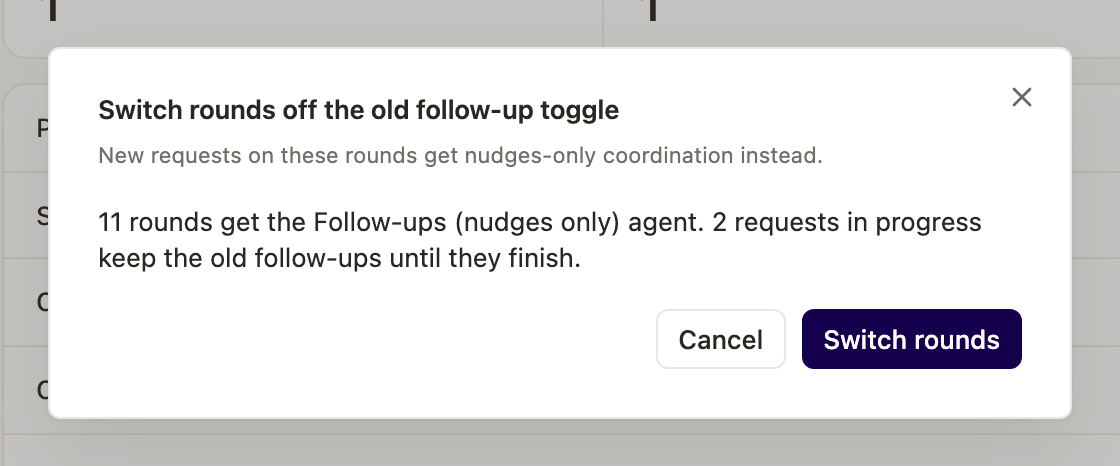
The Switch rounds off the old follow-up toggle window opens and counts your rounds. It shows:
how many rounds will get the Follow-ups (nudges only) agent
how many rounds already have a Coordination Agent. These keep their agent and only lose the toggle.
how many requests in progress will keep the old follow-ups until they finish
Click Switch rounds.
You'll see "Switched N rounds". Click Open agent to see the new profile.
What you get
One new Coordination Agent profile, Follow-ups (nudges only), with the standard nudge settings: candidate follow-ups and interviewer attendance nudges on, everything else off.
That profile on every active round that had the toggle on. Archived rounds aren't touched.
The old toggle turned off on those rounds. It no longer shows in the round builder once a Coordination Agent is set. [CONFIRM: the legacy round settings window still shows "AI Followup Agent". Fix it before publishing, or mention it here?]
The new profile starts on the defaults because the old toggle had no settings to copy. To change what it sends, open the profile and adjust Nudges (see Coordination Agent: Nudges only mode and nudge settings). To give a round a different profile, change it on the round (see Coordination Agent: Add agents to a round).
Example
Initech has 16 rounds with the follow-up toggle on and 3 requests in progress.
An admin clicks Review switch and then Switch rounds. All 16 rounds now carry Follow-ups (nudges only), and the toggle is off. The 3 open requests finish with the old follow-ups. The next candidate who doesn't share availability gets a follow-up from the Coordination Agent.
Troubleshooting
"It says nothing to switch." No round has the old follow-up toggle on. You're done.
"Couldn't load the counts." Click Try again. If it keeps failing, contact your candidate.fyi team.
"A round kept its own Coordination Agent instead of Follow-ups (nudges only)." That's expected. Rounds that already had a Coordination Agent keep it, and only the toggle is turned off.
"Will a candidate get two sets of follow-ups?" No. Once a request has a Coordination Agent, the old follow-up agent doesn't run on it.
Related Articles
Coordination Agent: Add agents to a round (new, link after publish)
Coordination Agent: Nudges only mode and nudge settings (new, link after publish)