Interview Companion for ATS-scheduled interviews: Cancellation Webhook
Last updated: July 17, 2026
Overview
Your ATS integration already syncs interviews into Candidate.fyi. That is enough for Interview Companion to join new interviews.
The webhook is for required for cancellation handling. When an interview is deleted or cancelled in Greenhouse, the webhook notifies Candidate.fyi immediately so the Interview Companion can be adjusted accordingly.
The webhook is recommended. Without it, cancellations are not detected.
Before you begin
Contact your Candidate.fyi support team to request webhook setup. They will provide:
Your webhook endpoint URL
A signing secret to enter in Greenhouse
Both values must match what Candidate.fyi has on file. If the secret does not match, requests will be rejected.
Greenhouse Webhook Setup
Create the webhook in Greenhouse
In Greenhouse, go to Configure → Dev Center → Web Hooks
Click "Webhooks" link
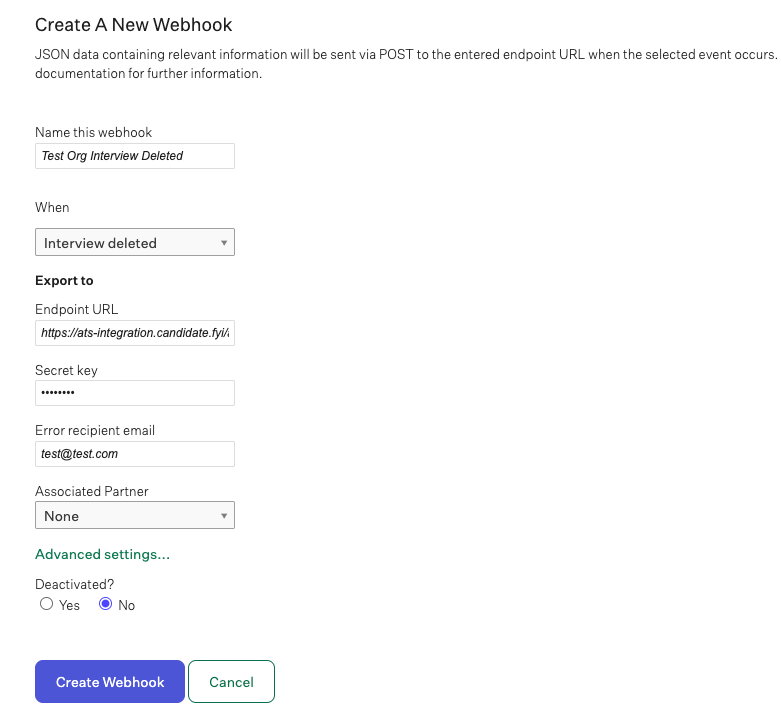
Name the webhook
Under "When", select Interview deleted.
Enter the endpoint URL provided by Candidate.fyi. It will look like:
Enter the signing secret provided by Candidate.fyi
Set "Deactivated?" to No
Save the webhook
Greenhouse will automatically send a test ping to confirm the webhook functions
About the signing secret
Greenhouse requires a signing secret when you create a webhook.
Greenhouse does not show the secret again after you save. The secret field in Dev Center may appear empty — that is normal. Greenhouse still signs requests with the secret you entered at creation.
If you need to rotate the secret, create a new secret in Greenhouse and ask Candidate.fyi to update the matching value on our side. A mismatched secret will cause webhook deliveries to fail.