Interview Companion for ATS-scheduled interviews
Last updated: July 17, 2026
Use Interview Companion on interviews scheduled in your ATS — without scheduling through Candidate.fyi.
Overview
If your team schedules interviews in an ATS, you can still have Interview Companion join those calls and capture AI notes — even when the interview was not scheduled through Candidate.fyi.
This is a per-interviewer opt-in. Each interviewer chooses whether Interview Companion should join their ATS-scheduled interviews.
How it works
An interview is scheduled in your ATS.
Candidate.fyi syncs the interview through your existing ATS integration.
For each future interview, Candidate.fyi checks whether a listed interviewer has opted in and has a default Interview Companion configured.
If yes, Candidate.fyi attaches the Interview Companion Agent to that interview
If the interview is rescheduled, cancelled, or updated in the ATS, Candidate.fyi updates or removes the companion accordingly.
Prerequisites
Before enabling this setting, confirm the following:
Your ATS integration is connected and interviews are syncing into Candidate.fyi
You have a default Interview Companion agent configured on your profile
The interview is scheduled in the future and has not been cancelled
Enable ATS-scheduled interviews (per interviewer)
Each interviewer enables this individually in their Interview Companion settings.
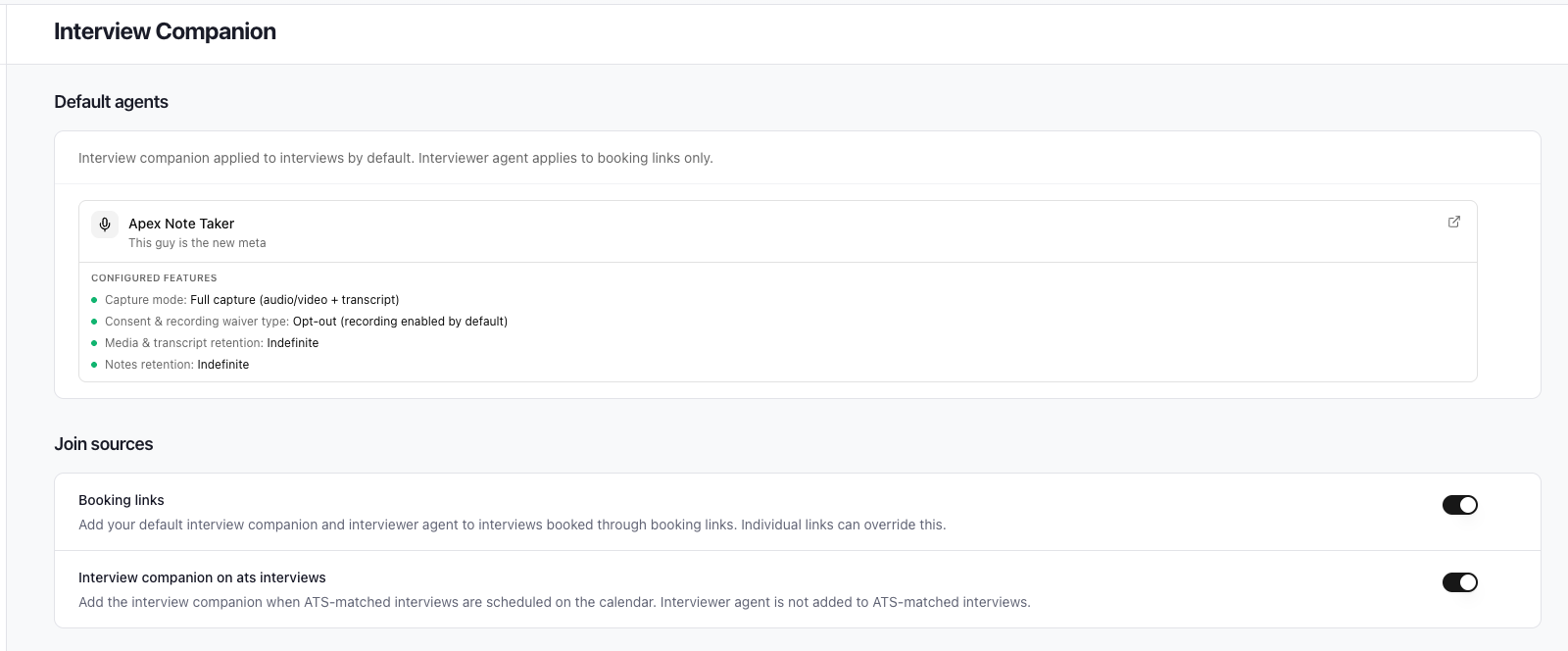
Go to your Interview Companion settings in your profile.
Confirm you have a default Interview Companion selected.
Enable Interview companion on ats interviews.
Save your settings.
Important details
Off by default. You must turn this on for it to take effect.
Per interviewer. Only interviews where you appear on the ATS interviewer panel are eligible.
Requires a default agent. You need a default Interview Companion configured before this toggle does anything.
Multiple interviewers. If more than one opted-in interviewer is on the panel, Candidate.fyi uses the most restrictive notetaker policy among them.
Turning it off cancels future Interview Companion bots for your ATS-matched interviews. Notes from completed interviews are preserved.
What to expect over time
Scenario | What happens |
|---|---|
New future ATS interview, interviewer opted in | Companion attached after the next sync |
Interview rescheduled in ATS | Interview time updated; companion rescheduled if needed |
Video link added or removed in ATS | Bot scheduled or cancelled accordingly |
Interview cancelled in ATS | Future companion cancelled (requires webhook setup) |
Interview already started or completed | Cancellation is a no-op; notes are preserved |
Interviewer removed from ATS panel | Re-evaluated; companion may be cancelled |
Toggle turned off | Future ATS-matched companions cancelled for that interviewer |
Candidate recording consent
ATS-scheduled interviews follow the same recording consent rules as other Interview Companion interviews. Because Candidate.fyi does not send calendar invites for these interviews, include a consent link in your Greenhouse interview emails (or other candidate communications) when your Interview Companion is configured for opt-in or opt-out consent.
Greenhouse
Build a link with the candidate's ID
Use the {{CANDIDATE_ID}} token to build a stable URL that works across your ATS and Candidate.fyi:
https://{your-org-subdomain}.candidate.fyi/v1/portal/consent/{{CANDIDATE_ID}}In Greenhouse, this is applicable to email templates.
What candidates see
When a candidate opens the link, they land on your organization's consent page where they can opt in or opt out of recording. Their choice applies to Interview Companion for that candidate going forward, consistent with your agent's consent settings (opt-in vs. opt-out).
Good to know
Consent is managed per candidate, not per interview.
If you don't include a consent link in your ATS emails, candidates can still receive one in the meeting chat — but sending it ahead of time is best practice for opt-in flows.
Consent requirements are set on your Interview Companion agent configuration. See Setting up Interview Companion for details on opt-in vs. opt-out behavior.
Webhook Setup (recommended)
Setting up a webhook allows us to track deleted interviews in the ATS and manage the Interview Companion accordingly. View the article below to see how to set it up.