Restricted Calendar Events
Last updated: July 22, 2025
Restricted Calendar Events is a feature that allows you to limit interview scheduling availability to specific calendar events or time blocks. When enabled, candidates can only schedule interviews during times that fall within the specified calendar event blocks on interviewers' calendars. Suggested slots will also only suggest times that coincide with these calendar events.
How It Works
The Restricted Calendar Events feature works by:
Reading specifically named calendar events from interviewers' calendars
Only showing availability or suggested slots during those calendar event time blocks
Ignoring all other available time slots, even if the interviewer appears free
Ignoring all non-candidate.fyi events within the block
Setup Instructions
Enable the Feature:
Navigate to your round settings
Go to All Settings > General
Enable "Restrict Availability to Calendar Event"
Enter the exact name of the calendar event you want to restrict to
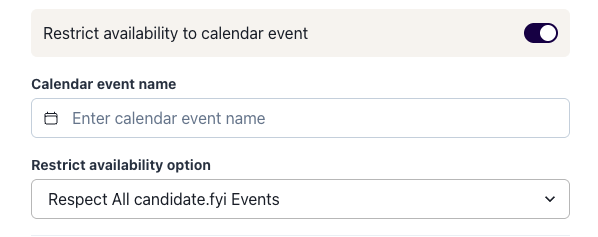
The "Respect Availability Options" refers to what events we should not overwrite.
In most cases you will want "Respect All candidate.fyi Events". This will not allow scheduling over any events created by us.
"Respect candidate.fyi round events" will only respect events created by us for the that round. So if a candidate is booked during that time for a different round it will allow them to book over them.
Calendar Event Details
Interviewers must create or be invited to calendar events with the specified name
The event name must match exactly to whats entered in the round settings
Events must be visible (not private) to the scheduler
Only one calendar event name can be specified per round
Declined calendar events are not recognized by the system
Common Use Cases
Date Range Restrictions
Limit interviews to specific date ranges
Executive Interview Management
Control when executives are available for interviews: create specific "Executive Interview" blocks on their calendars to only show availability during these pre-approved time slots
Complex schedules
Interviewers only available during different days/hours
Best Practices
Naming Conventions
Use clear, descriptive names like "Interview Hold - [Role]"
Ensure all interviewers use the exact same naming convention
Consider including the role name if interviewing for multiple positions
Calendar Management
Coordinate with interviewers to ensure they create the required calendar blocks (you can also create the blocks yourself and invite them)
Verify that calendar events are not marked as private
Troubleshooting
No (or partial) availability showing?
Verify the calendar event name(s) matches exactly
Ensure events are visible (not private) to the scheduler