Personal email templates
Last updated: October 26, 2026
Personal email templates allow you to create and manage your own custom email templates for interview scheduling and candidate communication. Unlike organization-wide templates that are shared across your company, personal templates are tied to your individual account and can be customized for your specific use cases.
Overview
Personal email templates provide you with:
Individual customization: Create templates that reflect your personal communication style and workflow
Easy access: Find your templates on the Email Templates page under the "My Templates" tab
Flexible application: Assign personal templates to specific interview rounds, interview plan stages, or job automation stages
Persistent ownership: Your templates remain accessible even if you change roles within the organization
Creating a Personal Email Template
Step 1: Navigate to Email Templates
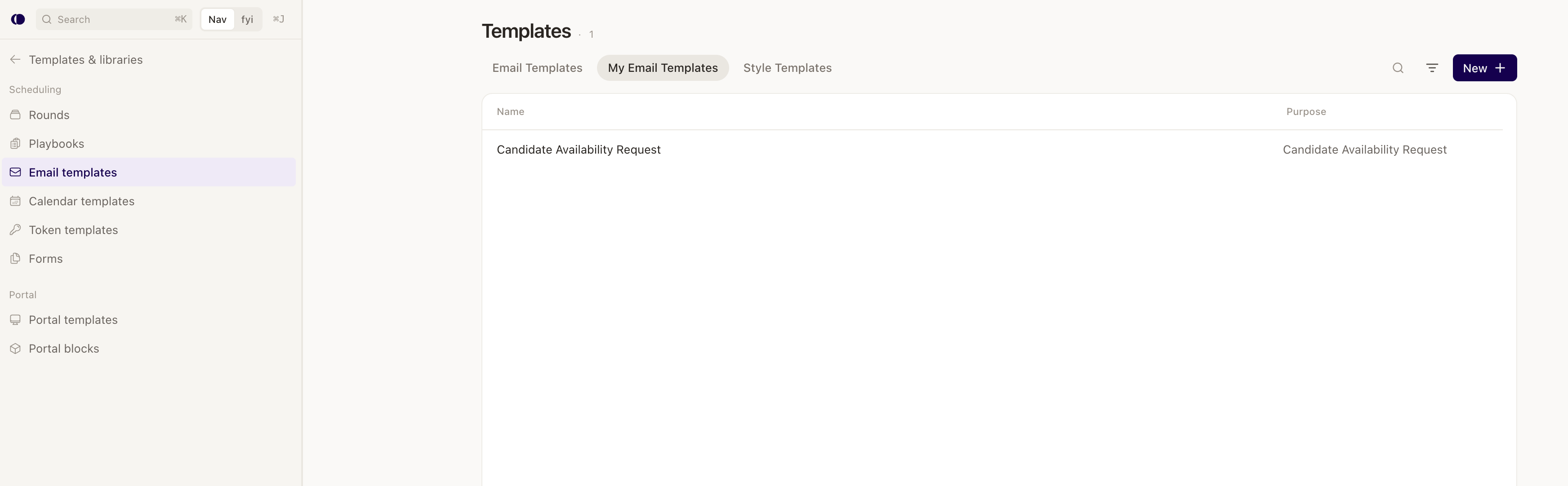
Log in to your candidate.fyi account
Go to Templates & Libraries in the side navigation
Click on Email Templates
Click the "My Email Templates" tab to view your personal templates
Step 2: Create Your Personal Template
Click the "New +" button to start creating a new template
In the template creation form, select the option to make this a personal template
Step 3: Fill in the Template Details
Complete the template fields including name, purpose, subject line, and body content. You can use tokens for personalization.
Step 4: Save Your Template
Click Save to add the template to your personal template library.
Using Personal Templates
Assigning to Settings
You can assign your personal email templates as defaults for:
Interview Rounds: Set a personal template as the default email request or confirmation template
Playbook Stages: Assign a personal template to ensure consistency in communications for specific stages
Job Automation Stages: Configure job automation stages to use your personal templates by default
When a personal template is used in one of these settings, you can view and preview it to see how it will appear to candidates. However, you cannot edit someone else's personal template.
Messaging in Scheduling Requests
You can also use your personal templates when sending messages within scheduling requests. Simply select your personal template from the template dropdown when composing your message.
Important Notes
Personal templates are linked to your individual account, not shared organization-wide
What happens if someone leaves the company and a personal template is used?
Your templates remain accessible even if you leave the organization. If a personal template is assigned to a round, interview plan stage, or job automation stage, it will continue to function and can be viewed by other team members.